Good! It’s important to keep this log/instructions for future reference.

@Miguel could you look into re-enabling the S3 backups on this new server? Not sure what the issue is, it worked on old server but not on new one, and it was the same keys… a good opportunity to update the backups to the new AWS account if it wasn’t already done.
Yes, but today (Saturday here) I’m about to start giving a class that I’ll finish at noon, and then I’ll have another one right after lunch. I may be able to take a look at it more towards evening if not tomorrow (Sunday).
Well, @claudiu, I just spent a little time on:
- Join “My Team” on DigitalOcean (invited by Claudiu via actuality.consulting).
- Join “My Team” on DigitalOcean (invited by aiaffund)
(I hadn’t done it until now) The first was the old droplet (your own/personal space) and the second is the new (AIAFF) one?
- I logged in to the Aiaffund Amazon account with the credentials you sent me (and changed my password) to look at the problem with the S3 backups and this new server.
What I see is that @son_of_bob did not create the bucket yet. Since Discourse warns in Settings - Backup that valid S3 credentials are required to be entered (in Files settings), I think that’s the problem.
Since @son_of_bob wanted/agreed to create it himself, maybe he missed that I wrote that he does
regardless of whether or not he is added as a moderator.
By the way, just now I noticed that your name is not an alias, and as well as your last name both are truly -and beautifully- Romanian!
Sorry I haven’t had a spare moment yet to look at the other backup type for my own bucket.
Out of curiosity is this done via entering the console of the droplet on DO?
So, the volume doesn’t seem to have a mechanism for transferring across like the droplet snapshot. You can take a snapshot of the volume but then can’t transfer it to another team.
So, where did you run these commands on the droplet console?
Ok, I have only looked at the DO instructions given I haven’t touched anything with Discourse. Are these Discourse settings in the admin console? Is this also accessed via console from droplet?
@Miguel, I did see but thought it was just something to do for having an alternative backup location eventually, rather than something to immediately address.
I’ve just read this whole thread and understood nothing but it was great fun
A bit like overhearing a nasa team preparing for a rocket launch
Thanks for doing all this @son_of_bob @claudiu @Miguel
Technology is really amazing, this makes me appreciate all that is necessary for me to be able to share memes here…
1 Like
Ya
I ran them on my local computer – copying from one volume to my local, then my local to the new volume
Maybe the following explanation will clarify things:
In this new droplet created in DO on behalf of AIAFF, Discourse backups are being made, so you don’t have to rush. Don’t worry.
The making of these backups is a property of Discourse itself -and cover only Discourse, not the whole droplet- and are configured in the folowing administration page (from here, the web interface):
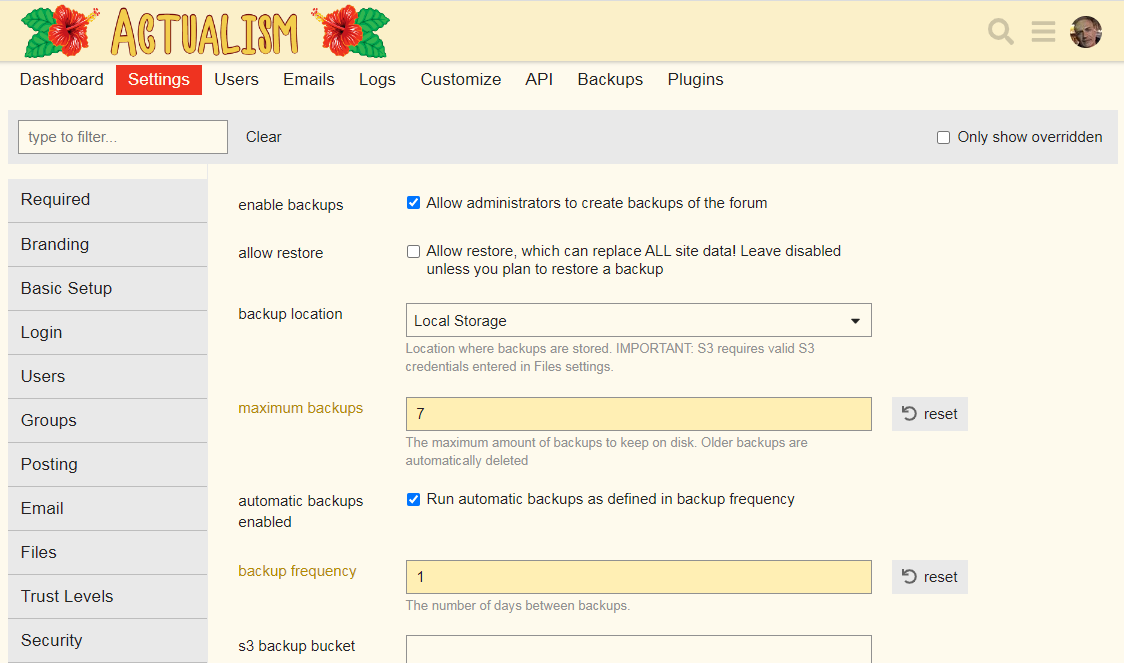
BUT, as you can see in the image, they are stored locally. They cannot be automatically copied also to a second location belonging to users (these users should manually download the backups every day, from here):
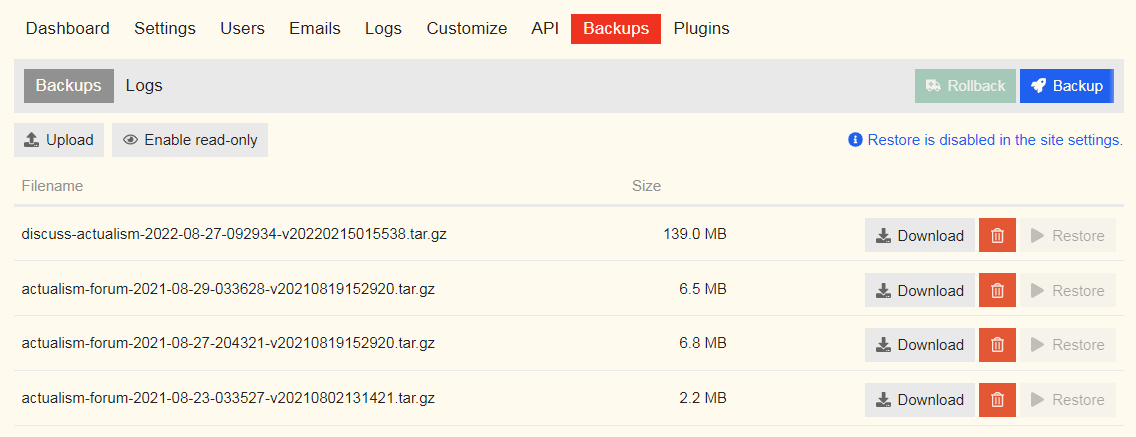
(only administrators can enter both pages)
However, you can also see in the first image that Discourse has the option to backup to an Amazon S3 bucket. So a new account has been created on Amazon on behalf of AIAFF. This bucket has nothing to do with DO. You must create the bucket by logging in with username and password provided by @claudiu.
When the bucket is ready, Discourse must be configured to use it (from the same page shown in the first image).
The advantage is that services like MultCloud can copy daily, automatically and free of charge from an S3 space to personal cloud spaces like Google Drive, Dropbox, etc.
The post you can’t access is where it is explained how to set up these personal accounts in MultCloud by staff members who want to transfer copies of those S3 backups to their cloud spaces, to create an additional layer of security.
But this cannot be done until the bucket is configured in Amazon and its data entered in Discourse.
Aye - actually I removed you guys from the old one as that was technically my business’s account, and it was only needed for the initial transfer.
Thanks for the explanation @Miguel, I forgot to send this reply sorry.
Where is this local storage pointing to? Does it mean the local storage of that backup location for Discourse in the screenshot?
Yes, I noticed this. A pretty simple setup approach.
Ok, yes I am aware of MultCloud and other alternatives.
Yes that makes sense. So, with MultCloud we get it to backup to the AIAFF Amazon bucket and then from there we could technically use MultCloud to backup to our own Amazon buckets as well (or equivalent S3 capable cloud platform)?
Yes, “local storage” means: every day Discourse make a backup, it is stored in some internal folder here, in the droplet.
No, is the other way around: once a bucket is available, Discourse can be instructed to no longer save those backups locally but to send them to Amazon. Then MultCloud copies them FROM the bucket TO personal accounts (so, if MultCloud could directly access Discourse backups, there would be no need to use Amazon as an intermediate step for individual users to also have them automatically -of course, even in that case we could choose to have an additional backup in S3 or elsewhere-).
Thanks for clarifying. Ok, so we could break it down into the following list of tasks:
- Set up an Amazon account for AIAFF.
- Create an S3 bucket.
- Configure Discourse backup to point to the S3 bucket with valid credentials.
- Set up MultCloud account.
- Set up personal Amazon account (or alternative platform with S3 capabilities)
- Configure MultCloud to copy from AIAFF Amazon S3 bucket to personal account/s.
Out of these tasks are any complete yet?
Task 1 is complete.
1 Like
Ok, great. Do you want me to do step 2 then? I am happy to try and learn and one of my close friends is an infrastructure guy and Amazon AWS is his bread and butter so to speak, so if I get stuck I can lean on him for support.
Yes, go for it
Please can you PM credentials for the Amazon AIAFF account then.
I can’t. I had commented before that you have to
He sent my credentials.